
How to Withdraw Money from KC99 Game? Complete Guide 2026
Withdraw your winnings from KC99 Game is a quick and straightforward process. Once you have an available balance in your account, you can transfer your funds using one of the supported payment methods. Whether you’re cashing out for the first time or you’ve used the app before, this guide explains each step clearly to help you complete the process without any confusion.
KC99 supports popular payment options in Pakistan, making it convenient for players to receive their money safely and efficiently.
Steps to Withdraw Money from KC99 Game
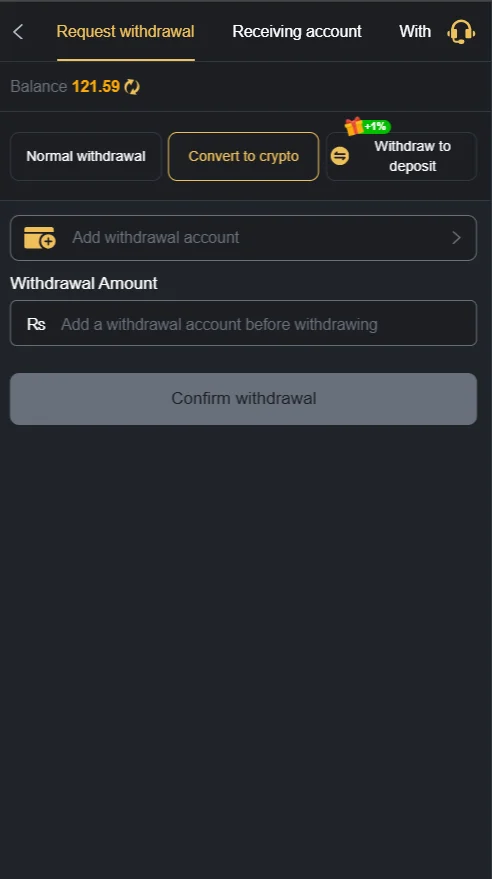
Log In to Your KC99 Account
Open the KC99 app and sign in using your registered account details. Make sure your account information is correct before requesting a withdrawal.
Open the Member Center
Tap the Member or Profile icon from the home screen. This section lets you manage your account, view your balance, and access the withdrawal page.
Select the Withdrawal Option
Inside the Member Center, tap the Withdrawal button. You will see the available payment methods and any applicable withdrawal limits.
Choose Your Payment Method
Select the account where you want to receive your money. KC99 commonly supports:
- EasyPaisa
- JazzCash
- Bank Transfer (if available)
Make sure the payment details you enter are accurate to avoid delays.
Enter the Withdrawal Amount
Type the amount you want to transfer. Ensure your account balance meets the minimum withdrawal requirement before submitting your request.
Review Your Details
Double-check your payment information and the amount entered. Correct details help ensure your request is processed without unnecessary delays.
Submit Your Request
Tap the Confirm button to send your request. Once approved, the money will be transferred to your selected payment method. Processing times may vary depending on the payment option.
Tips for Faster Withdrawals
- Use the same payment account linked to your KC99 profile.
- Verify your account information before requesting a withdrawal.
- Check that you meet the minimum withdrawal limit.
- Enter the correct account number or wallet details.
- Contact customer support if processing takes longer than expected.
Conclusion
Receiving your winnings from KC99 Game is simple when you follow the correct steps. Select a supported payment method, enter accurate account details, and submit your request. Keeping your account information up to date can help speed up the process and reduce the chances of delays.
Frequently Asked Questions
What is the minimum amount required to cash out?
The minimum amount may vary depending on the payment method. You can check the latest limits in the Withdrawal section of the app.
Which payment methods are supported?
KC99 commonly allows transfers through EasyPaisa, JazzCash, and bank transfer, depending on availability.
How long does it take to receive the money?
Most requests are processed within a few minutes, although some transactions may take longer depending on the selected payment method.
Why is my request still pending?
Pending requests can occur due to account verification, incorrect payment details, or processing delays. If the status does not change after some time, contact customer support.
What should I do if I enter the wrong payment details?
Contact customer support as soon as possible. They can guide you on the next steps if your request has not yet been processed.