
How to Deposit Money in KC99 Game? Full Guide 2026
Depositing money into KC99 Game is quick, secure, and beginner-friendly. Once you add funds to your account, you can enjoy your favorite games, unlock special promotions, and participate in exciting events. Whether you’re making your first deposit or adding more balance, this guide explains the complete process in simple steps.
KC99 supports popular payment methods in Pakistan, making it easy for players to fund their accounts. Follow the instructions below to complete your deposit without any confusion.
Steps to Deposit Money in KC99 Game
Log In to Your KC99 Account
Open the KC99 app and sign in using your registered mobile number or username and password. If you don’t have an account yet, complete the registration process before making your first deposit.
Open the Member Center
After logging in, tap the Member or Profile icon located at the bottom of the home screen. This section allows you to manage your account, deposits, withdrawals, and transaction history.
Select the Deposit Option
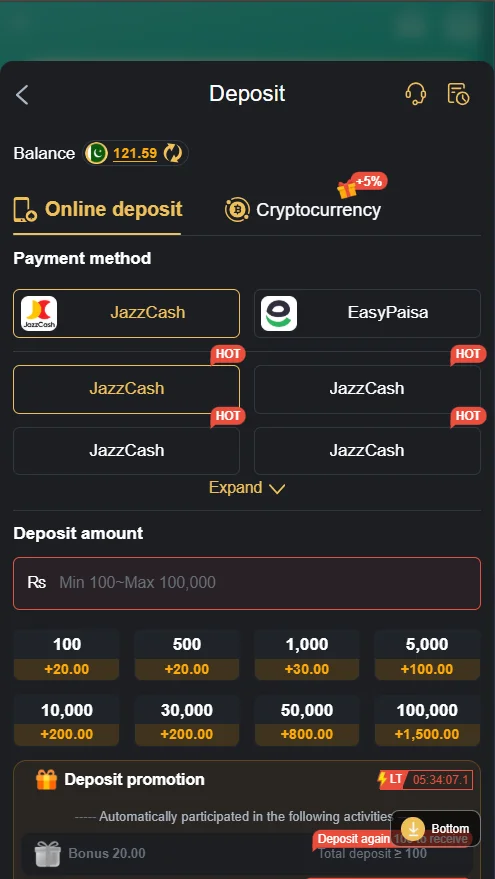
Inside the Member Center, tap the Deposit button. The app will display all available payment methods along with the minimum and maximum deposits limits.
Choose Your Payment Method
Select the payment option that suits you best. KC99 commonly supports:
- EasyPaisa
- JazzCash
- Bank Transfer (if available)
Choose your preferred method to continue with the payment.
Enter the Deposit Amount
Type the amount you want to add to your account. If you’re new to the platform, it’s a good idea to start with a small deposit until you’re familiar with the games and features.
Claim Available Deposit Bonuses
Before confirming your payment, check whether any deposit promotions are available. New and existing players may receive welcome bonuses, cashback offers, or limited-time rewards that increase the value of their deposit.
Confirm the Payment
Review your payment details and tap Confirm. Complete the transaction through your selected payment method. Once the payment is successful, your account balance is usually updated within a few minutes.
Tips for a Successful Deposits
- Use the payment method linked to your own account.
- Double-check the deposit amount before confirming.
- Ensure your internet connection is stable during the transaction.
- Keep the payment receipt until the balance appears in your account.
- Contact customer support if your deposits is delayed.
Conclusion
Depositing money into KC99 Game is a simple process that only takes a few minutes. By choosing a supported payment method, entering the correct amount, and confirming the transaction, you can quickly add funds to your account and start playing. Always check for available deposits bonuses before completing your payment to get the most value from every deposit.
Frequently Asked Questions
What is the minimum amount required to get started?
The minimum amount depends on the payment method you choose. You can check the latest limits in the app before completing your transaction.
Which payment methods are available?
KC99 commonly supports EasyPaisa, JazzCash, and bank transfer. The available options may vary based on your account and region.
How long does it take for the balance to appear?
Most transactions are completed within a few minutes. In some cases, processing may take a little longer depending on the selected payment method.
Can I receive a welcome bonus?
Yes. New players may qualify for welcome rewards or limited-time promotions. Check the Promotions section before completing your payment.
What should I do if the funds don’t appear in my account?
Refresh your account after a few minutes. If the balance is still missing, contact customer support and provide your transaction details for assistance.